andyoneil

Tech / Dev / Geek Stuff

Tech, dev & geek stuff.

Music tech, development, hardware & software devices, and other inventions.

>> Expand section <<

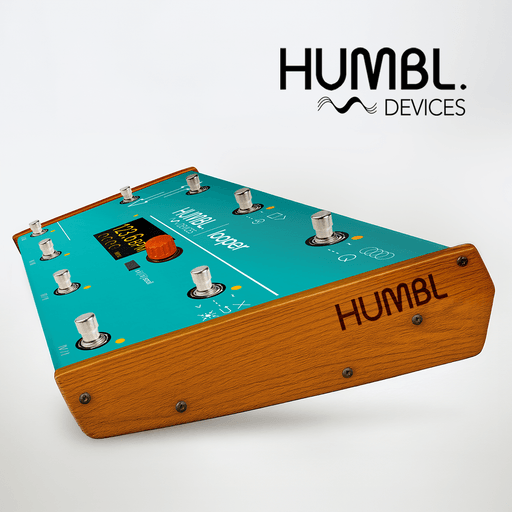
HUMBL Devices

HUMBL Looper product image

Hardware Devices, Product Development

humbldevices.com

Home of the HUMBL Looper, an innovative & creative rethink of the traditional looper pedal format. Hardware device, designed for live performance and studio / sound design. Winner of the WA Innovation Booster Grant 2024/2025. Launching 2026.

Project entries

HUMBL Looper

Primary hardware product entry for the HUMBL line. Use this box for product shots, workflow explanation, and specific device details.

Technical entries can support screenshots, device photos, process notes, and links out to repositories or product pages without changing the overall page pattern.

The visual system should stay simple here: clear text, strong image framing, and just enough accent color to keep it in the same world as the homepage.

>> Expand section <<

NewNow Devices | iOS/macOS + Android apps

NewNow

Software Devices

newnowdevices.com

NewNow Devices is the software-focused sibling to HUMBL Devices. Where HUMBL leans into music tech hardware / physical products, NewNow Devices focuses on the software systems that run, shape, and extend creative practice. Recent releases include the SetBreakCalc for iOS, "SongSearch" a Rekordbox/streaming platform parser and organiser, and a commissioned cross-platform app for a large-scale performance work "Carrying the Fire" (commissioned by SEA and FORM)

Project entries

SetBreakCalc for iOS

A dedicated product box for SetBreakCalc. Use this for platform-specific notes, screenshots, and release detail.

This entry is intended for the app itself rather than the overall NewNow software line, so you can write product-specific copy here.

Tool screenshot placeholder

Rekordbox / streaming parser and organiser

A separate box for the parser / organiser tool so it can sit beside the apps as its own product entry rather than being folded into one long text block.

Use this entry for what the tool ingests, what it outputs, and what problem it solves in a working DJ or library-management workflow.

Product screenshot placeholder

Commissioned app | "Carrying the Fire"

A dedicated box for the commissioned SEA / FORM software work, so it does not get buried inside one uninterrupted accordion body.

Use this entry for commission context, technical approach, and any screenshots or interface details that belong specifically to this software product.

>> Expand section <<

NewNow Devices | Plugins & Max for Live devices

NewNow Devices logo

Software Devices

newnowdevices.com

A suite of plugins, software & sample based instruments. Software instruments from Andy's personal collection, developed during commissions as a sound designer for immersive art and contemporary dance works. Max for Live devices and tools for Ableton Live were created specifically The New Now (Andy's live/DJ crossover act), for innovastive live performance, looping and improvisation, and they have been let out into the world as free downloads for anyone to use, modify, and build on.

Project entries

DrumRackViewer - Max for Live

Placeholder copy for DrumRackViewer. Use this entry for what the device shows, how it fits into an Ableton workflow, and what problem it solves in live or studio use.

Add more detailed placeholder text here for DrumRackViewer. This can later become notes about device behaviour, workflow, design decisions, release status, or links out to downloads and documentation.

TempoScreen screenshot placeholder

TempoScreen - Max for Live

Placeholder copy for TempoScreen. Use this entry for the practical use case, interface, and what this device contributes during performance or rehearsal.

Add more detailed placeholder text here for TempoScreen. This can later become notes about timing visibility, stage use, display logic, or other workflow details.

ClipNameSetlist screenshot placeholder

ClipNameSetlist - Max for Live

Placeholder copy for ClipNameSetlist. Use this entry for the setlist or clip-management problem the device solves and how it fits into a live Ableton setup.

Add more detailed placeholder text here for ClipNameSetlist. This can later become notes about set organisation, clip display logic, workflow, or release details.

Quarantones Choir - Kontakt sample instrument

Quarantones Choir is a sample-based choir instrument, for the full version of Kontakt.

It was built from the voices of professional vocalists, recorded during illness. Not studio-bright voices, not polished choir vowels, not the clean sustained notes people usually try to capture. These were rough voices: broken, tired, airy, cracked, and barely able to sing.

Created from a curiosity, really. I noticed that when a voice is sick, I often like the timbral quality of it. Notes pull apart. The air changes. Unusual overtones appear, creating a strange and airy richness. Quarantones Choir was made from those moments.

The result is a vocal instrument with a soft, beautiful, but slightly damaged character. I've used this a ton in my own sound design and compositions, and I hope you enjoy it too.

>> Expand section <<

CaveCode | CLI tool

CaveCode CLI screenshot

Open Sourced Software

GitHub Repo

CaveCode is a tool to help trace and understand C and C++ code before editing it. Point it at a file or project and it emits a structured map of each function’s control flow, guard exits, calls, scalar return states, field reads/writes, and any uncertainty. It is especially useful for large and complicated C systems & refactoring work. Developed for both human developers/coders as well as a tool for LLM coding agents, to condense source-backed context and knowledge of seams before making changes.

Project entries

CaveCode CLI

CaveCode is a source-understanding tool for C and C++ codebases. It parses real source files and produces compact, structured summaries of function behavior: guards, branches, returns, calls, scalar state, field reads/writes, loops, switches, and unresolved control-flow regions.

It is designed for both coders/engineers/developers and embedded systems engineers, as well as LLM coding agents. The idea is that the user can quickly and easily understand unfamiliar and large C or C++ code bases. CaveCode gives a first-read map of a file or project so you know where the important logic, exits, side effects, and uncertainty are before making changes.

Additionally, when used with LLM's,CaveCode gives an extremely compact, but legible & digestible, source-backed understanding layer for C/C++ code, which both drastically reduces token count and context window blow outs (common in C code reads). As an example, in a real (and extremely complicated) Buffer subsystem of one of my projects, `scan-project --brief` reduced ~124k estimated raw-source tokens to ~8.8k tokens, a ~93% reduction, while still surfacing the highest-risk functions, guards, calls, and outcomes.

CaveCode uses a generic Tree-sitter backend and a domain-neutral fact/regime pipeline. This makes it useful both as a standalone developer tool and as infrastructure for AI-assisted code archaeology, refactoring, and safety checks.

Core features:

  • - Per-function summaries for C/C++ files
  • - Guard and early-return detection
  • - Scalar dataflow at return points
  • - Struct field read/write auditing
  • - Enum and struct inventory
  • - Cross-file call indexing
  • - Dead helper detection
  • - Format-string audits
  • - Compact explanation mode for large functions
  • - JSON output for programmatic use
  • Cavecode is released as open source on GitHub, with a permissive license for both personal and commercial use. Distributed as a CLI tool, the source code and documentation is available for anyone to explore, modify, and contribute to. Contributions for additional features, language support, or integrations are welcome on the GitHub repository.